Pin It button on image hover
Showing posts with label Writing. Show all posts

Tuesday, July 10, 2012

Story telling with Storybird.com

                                                              Refrigerator Babies on Storybird

Have you tried Storybird.com yet?  It is a fun online site for kids to use to write stories/books.  The site provides sets of illustrations, the student chooses pictures from a set and writes a story to accompany the pictures.

My students last year liked it, and I liked that it was an easy way for them to share their writing with me, their classmates, parents, or grandparents!

On this site, you create a class and enter your students names.  Students then use their username and password to access the site.

It was a great option for my students to use during their independent writing time.  It also allows for the teacher to create an assignment for the class.  I would recommend that you check it out as an option for the next school year!

Thinking of writing, you still have time to link up and share a mentor text to use when teaching students about voice. 

Sunday, July 8, 2012

Find your Voice! Linky party


Hey There!  I am having a Linky party to develop a group of mentor texts for teaching kids about voice in writing.  I hope you'll join me!

I am trying to work on my Writer's Workshop this summer.  I feel like I am on the verge of making it happen, but I have to say, I feel like it is the blind leading the blind when it comes to writing.  I think that it is because I don't remember being taught how to write until I was a senior in high school, and then, Mr. Meyer never stopped!  Before him, we were just told TO write, nobody conferenced with us or talked to us about writer's craft.  He helped me a lot, but I certainly can't teach my 3rd graders the same way he taught us!

So,  I am working on some mentor texts, and I thought I would start with VOICE.  I have two that I use, and I am sure you are familiar with them.

I LOVE The True Story of the Three Little Pigs by Jon Scieszka.


This book is the story of the 3 Little Pigs as told by the wolf.  It is very cute, and the wolf's voice is very strong. 

My kids love it, too, but it is one they are very familiar with.  I like to use it for CAFE lessons, too, like point of view and author's purpose.  So, while it works well for voice, I thinkit might be a little overused by 3rd grade.


I also love the story Hey, Little Ant by Phillip and Hannah Hoose.


This is a great story, too.  It is the story of a boy who is trying to decide if he is going to smoosh an ant, and the ant's argument of why he shouldn't be smooshed.  Very cute.  It is written in rhyme. 

Often, my kids aren't familiar with this book when they come to me, but I have so many ways that I like to use it!  It is good because their are two voices, but it is also good as a persuasive mentor text, and for many CAFE lessons.

Do you have any mentor texts to share for teaching voice in writing?  Please, please, please link up with me and share!  I would love to find some new books to use for teaching voice, and this should give us plenty of time to find them before school starts!  Just grab my linky button at the top of this post.


Sunday, March 18, 2012

Interactive Graphic Organizers

Here are some great online graphic organizers I found for kids to use.  Some allow for students to input and print, and some allow for students to complete and embed. 


I am a big fan of ClassTools.net, and I have blogged about them before.  Both of these graphic organizers can be found there (plus a lot of other goodies!)  You can not print or save unless you upgrade, but I have the kids embed them.


This one is from Holt publishing, and it is a PDF which allows you to enter text.  It is a pretty good one, but this link will take you to a whole bunch of similarly formatted templates.


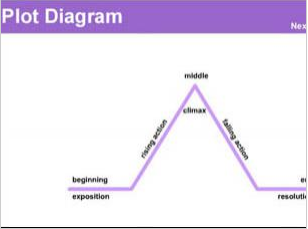
I found this one at Read Write Think.  It allows kids to place story information into a plot diagram.  Could be a great way to assess kids' knowledge of a text!


This one, from the BBC, is very easy to use, and allows you to save and print your final project.  There are a variety of options here, too.

As my district moves closer and closer to our digital conversion, I am encouraging teachers to try these tools with their students so that they can get a feel for all there is to offer out there.  That way, when the time comes for us to have 1:1 computers, it will seem like a gift rather than a challenge!

Do you have any great online graphic organizers you use?  Can you share?  I love to hear your ideas and comments!


Sunday, March 4, 2012

Digital Choices--Producers over Consumers

As my students and I have become more comfortable with our increased access to technology this year, I am looking to offer them more opportunities to "show what they know" with digital products.  The concern I have with the implementation of the computers into the classroom is that I don't want to become complacent and end up producing digital consumers rather than digital producers.

I have worked hard this year to present information to my students in many formats so that they can have examples of ways that they can share their information with me.

Last week was a great step towards success!  Each week, my students are given a basic writing assignment to complete before they begin their independent writing in Daily 5.  These take a variety of formats, and I often try to give them options.  Last week, they were given the topic of "What would you do with an extra day?"  They had a number of things to consider, but then they could create a product of their choice: poem, story, list, digital product....

They did a nice job really thinking about this possibility.  However, what pleased me more, is that I had a number of Powerpoints created for this assignment, some Vokis created, and nearly everyone who decided to do a story, poem, or list,  typed it up.  Finally, the best part, they all, no matter what the project, submitted these assignments to me digitally through Classconnect!  These are 8 and 9 year olds!  I am so proud of what they can do!


I will continue to work to make our assignments and projects capable of being digital so that kids can use some of the great creative sites out there.  It is empowering for them to have choice in their assignments, and it is wonderful for me to be able to receive assignments easily through Classconnect!

Saturday, February 18, 2012

Picture Prompt Linky Party


The Diary of a Not So Wimpy Teacher and Classroom Magic are having a Picture Prompt Linky, and I am joining in the fun.  You can use the above pics for creative writing starters in your classroom.  If you would like a copy of this Powerpoint, just click here.  To go to the linky party, click on the image above.  Hope you enjoy!


Thursday, January 26, 2012

Persuasive Writing Mentor Text

I am preparing a short unit on persuasive writing and have been looking for some mentor texts.  I found somewhere that the book Earrings by Judith Viorst would be a good one.


What a cute book!  I read it to my class, and they loved it!  It is the story of a little girl who wants to get her ears pierced.  She is very dramatic in her telling of her story, which really keeps the kids engaged.  The book also gives good examples of persuasive writing in that it tells not only HOW badly she wants the earrings, but also WHY she should be allowed to get her ears pierced.  We read the book one day and then created our anchor chart for persuasive writing using this text the next day. 

Do you have any other good books that you use for persuasive writing?

Sunday, January 8, 2012

Have you ever used a RAFT?

RAFT is a student choice project which allows students to show their knowledge of a subject in a variety of ways.

The above RAFT is one I created for a unit we are doing on Jane Addams.  Students have 6 project options that they can do which shows their knowledge of Jane Addams.

RAFT stands for Role, Audience, Format, and Topic. Students read across the row to determine which project will be best for them.  For example, a student may choose to be a social worker who is writing a letter to his parents explaining to them why he is so glad that he chose to be a social worker.  In the letter, he would list the jobs that a social worker at the beginning of the 20th century would have done.  This would be done in a way that keeps the voice of a child to a parent and follows the format of a letter.

The formats labeled DIGITAL are broad on purpose.  I have tried to expose my students to many different online tools as well as other publishing tools, and the digital term means they can use any of them...Photostory, Prezi, Glogster, Powerpoint, SMART Notebook...  All children will be encouraged to type their project.  Time is given in class for the work to be done because it is an assessment, and I want the child's ideas.

Have you ever used a RAFT?  In what subject did you use it?  The students appreciate the choice options, and I like the differentiated options that can reach learners at all levels show their understanding in a way that best suits them.

You can access a copy of the above RAFT plus the rubric I use to score it by clicking on the image above.

Monday, October 10, 2011

Fun October Writing Assignment

Kids love Halloween.  At the school I am at now, we celebrate Halloween, but that has not been true of all of the schools where I have taught.  For this reason, over the years, I have tried to steer clear of  doing too many Halloween activities.  I do, however, do a couple of different things that go well with the season.  Tonight I am going to share with you a quick little writing assignment that my students will have.

While I do the Daily 5, I do have my students have certain tasks that must  be completed in the week. After they complete the weekly assignment, then they can use their writing workshop time on whatever writing they wish.  While some may not consider this to be true Writers' Workshop, it works well for me, and it gives those students of mine who have a very difficult time writing, some direction and accountability for their time.
This week, my students will be creating a WANTED poster of an imaginary creature of their choosing.  I have used WANTED posters over the years for a number of assignments, but this one is always one of my students' favorites!  It is a simple assignment, so my expectations for spelling, details and sentences are pretty high.

Click on the images to get the WANTED poster description and the WANTED poster template.