Pin It button on image hover
Showing posts with label websites. Show all posts

Wednesday, July 25, 2012

Math technology for the new school year!


I am starting to get into the mode of preparing content for school rather than just thinking about what my room will look like and organizational materials.  I know those are important, but they tend to require less thinking than writing lessons.  I am slowly trying to gear my brain up for lessons...

Anyway, I have come upon some fun math technology tools that I am hoping to use this year.  I have posted before about math websites.    Most of these are new ones that I have recently found.  I thought I would share with you!

You know I love SUMDOG, so I'll just give them another quick plug in case someone out there still hasn't been to their awesome site.  My kids love Sumdog!

McGrawHill has a great work site with math tools that you could use on your SMARTBoard or have students use on individual computers.  Parents might even like to be able to use them from home.


Everyday Math has a very similar work site, too.  Both have their tools setup by grade level.

  http://everydaymath.com/EM_eToolkit_Demo/eTools_v1.html


This site from the UK has a puzzle each day.  Love it!


The MathFacts CAFE is free and gives you access to math worksheets, factsheets, and flash cards...


Finally, I liked this resource from Teacher LED will  help students visualize the process of multiplication.


I know there are so many great sites!  It is hard to pick which ones to share!  If you would like to share your own math technology sites, I would love to learn about them!

Tuesday, July 10, 2012

Story telling with Storybird.com

                                                              Refrigerator Babies on Storybird

Have you tried Storybird.com yet?  It is a fun online site for kids to use to write stories/books.  The site provides sets of illustrations, the student chooses pictures from a set and writes a story to accompany the pictures.

My students last year liked it, and I liked that it was an easy way for them to share their writing with me, their classmates, parents, or grandparents!

On this site, you create a class and enter your students names.  Students then use their username and password to access the site.

It was a great option for my students to use during their independent writing time.  It also allows for the teacher to create an assignment for the class.  I would recommend that you check it out as an option for the next school year!

Thinking of writing, you still have time to link up and share a mentor text to use when teaching students about voice. 

Saturday, July 7, 2012

Word Work Websites

One of my many summer goals is to strengthen my word work choices for my students.  I was pleased with the way my students worked their way through their Daily 5 Choices last year,but too many of them still view it as spelling practice.  I really want them to get the idea and fun of playing with words.  There is so much to be learned that way. With Words their Way, I have a number of sorts and other games, they can play with partners, but for many of my students, that is just busy-work.  They already understand the word and spelling patterns.

For my students, I am going to put together a list of word work web options.  They are typically assigned a word work goal for the week, so when they complete that task, they can move to a web activity if they wish.

Below are some sites that I think will be worth my students' while...
:


This Word Frog game is a little easy for some of my students, but it will be a good review for many.  They will like the animation and the game part of it.  Arademic Skill Builders has some other good word games, too.


This game is from Between the Lions and it is called Synonym Sam's lab.  Again, it is a little simple, but I like the exposure it will give my students to words.  It will be esp. good for those kiddos who are not really reading at grade level as well as my ESL students.


This Merriam-Webster site offers a much more difficult set of vocabulary for kids to use in finding synonyms/antonyms.  It will be great exposure to new words for some of my kds.


This balloon pop game practices 3rd grade prefixes and suffixes,  but the site does offer similar games at other levels.  This one looks like ones my kids will like, and I like the way it makes them think about the prefix on different base words.  It will be a great reinforcer!


I am going to probably let my kids do these Mad Libs with a friend.  That is what makes them fun!


Probably, a lot of kids have never played pinball, so this will be a novel idea for them!  This pinball game is similar to hangman.  As the kids send the ball over letters in the word, the letters are revealed at the bottom of the screen.


Not only does this Between the Lions game practice making/spelling words, it offers some higher level thinking for my kiddos by using jokes.  Jokes are often a difficult skill for student who are not familiar with our language and those who struggle with reading.  Fun little game:  Alphabet Soup!


This hangman site reviews the 300 most common words in our language.


This is just like the game Boggle.  I plan to have a boggle board on my wall this year, but I think this will be a fun alternative.  Besides, kids can practice at home!


This Letter Blocks game on ABCYa is a fun challenge for all.  It will add automatic differentiation for your kiddos.


This site offers something for all of my kiddos.  Good games like Hangman aqd Crosswords for my higher students, and syllable games and homophones for some of my students who find these skills difficult.

Do you have any good word websites to share?  I would love to have a great set of choices for my students!

Sunday, June 10, 2012

Everyday Math Workshop Freebie

So..........I ended last year using math workshop in my classroom.  I liked it, and my kiddos liked it, but as with anything new, it took a lot of work!  I am working this summer on being proactive and preparing my activities/games now so that I am not trying to find them during the year.  A colleague shared the following site recently, and it has some great resources for all grade levels!

We have updated to the Everyday Math "aligned to the Common Core," but it is the same old book with Common Core standards marked into each lesson.  It will take me a while to decide what to wean out and what to stress so that my classroom gets deep enough into Common Core.  Everyday Math naturally does much of the deep thinking, but I want to be sure to go deep enough into the standards.

Anyway, Chapter 1 is a lot of review, so we move pretty quickly, but I want some activities to go with it.  The first one I made is here.  If you are familiar with Everyday Math, you will recognize the number puzzles based on the 100s grid.  Each puzzle has three parts:  An answer key, the puzzle, and the number choices to use with the puzzles.  I am going to laminate the puzzle into a file folder, and laminate the numbers. Students can work to complete the puzzle then check their answers.  I have tried to make some different levels of puzzles to use.

You can click on this image to get the number puzzles.


Hope you can find a way to use this in your classroom.  Thanks!

Sunday, June 3, 2012

Some of my Favorite Websites Linky Party


I couldn't help but join 3-6 Free Resources Linky Party on favorite websites.  I have so many that I could write about, but I decided to narrow it down to 3.  These are all ones that I have blogged about before, but they all merit a second mention.  If you would like to find more websites, please check out the rest of my blog posts tagged WEBSITES.  :)

1.  Kidblog:  Kidblog played a big part in strengthening our reading community last year.  It is easy to use for adults and children, is made for education, and is FREE!  Check it out!


2.  Sumdog:  I feel confident in saying that my students would recommend this as their favorite website of the year.  It allows them to practice math skills while playing games.  Data is available to the teacher for a fee, but if you log on as one of your students, you can see that student's individual data, too.  Again, it is FREE.


3.  Voki:  My kids love creating Vokis.  We used them as project options, embedded them into our blogs, and to introduce new subject matter.  Again, you can pay a fee for a class subscription, but I just had my students on my account.  Another FREE option.

Share your favorite websites by linking up to this party!

Tuesday, March 27, 2012

Solar System and last day for Giveaway!

I am spending parts of my spring break getting ready for my units when we return.   I have had a student teacher the last couple of years at this time, so I haven't taught the solar system myself.  I am using the student-interest model for this unit.  I will teach core lessons/activities 2-3 times per week, but on the other days, students will be able to drive their own learning by exploring what interests them.

I am going to use ClassConnect to post a variety of articles and activities for them to access during this time, plus I will have a lot of books for them to use, too.  All of it will end with in-class projects which have clear guidelines but allow them to focus on the material they found most interesting.

Anyway, I'll give more specifics later.  Today, I wanted to share this awesome resource that I found today. 


KidsAstronomy.com offers games, interactives, teacher resources, and online classes for kids!  It covers all of the material that I am asked to cover (moon phases/constellations/the planets) and more!  It is a great starting point for students and is written in an easy way that they will be able to understand! 

I'll post more as I put together the details of this unit. (in between books and naps.)   :)

Finally, don't forget my Target gift card giveaway ends tomorrow morning.  I plan to pick the winner by 10 am, so get your entries in before then!

Sunday, March 18, 2012

Interactive Graphic Organizers

Here are some great online graphic organizers I found for kids to use.  Some allow for students to input and print, and some allow for students to complete and embed. 


I am a big fan of ClassTools.net, and I have blogged about them before.  Both of these graphic organizers can be found there (plus a lot of other goodies!)  You can not print or save unless you upgrade, but I have the kids embed them.


This one is from Holt publishing, and it is a PDF which allows you to enter text.  It is a pretty good one, but this link will take you to a whole bunch of similarly formatted templates.


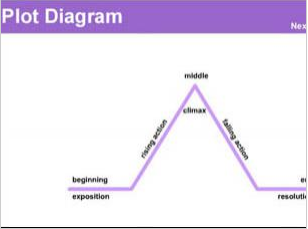
I found this one at Read Write Think.  It allows kids to place story information into a plot diagram.  Could be a great way to assess kids' knowledge of a text!


This one, from the BBC, is very easy to use, and allows you to save and print your final project.  There are a variety of options here, too.

As my district moves closer and closer to our digital conversion, I am encouraging teachers to try these tools with their students so that they can get a feel for all there is to offer out there.  That way, when the time comes for us to have 1:1 computers, it will seem like a gift rather than a challenge!

Do you have any great online graphic organizers you use?  Can you share?  I love to hear your ideas and comments!


Wednesday, February 29, 2012

Government Online Resources

I have been putting together my government unit, and here are some online resources that I have found...


This site has some simple little review games for the kids to do over the branches of government, checks and balances, and the executive branch


This is another nice site which covers the basic of government for kids.  It was created for a Thinkquest competition.


This Congress for Kids site focuses on Ithe legislative branch.


This PBS site was created for the 2008 Election, but it still has a lot of good information!


t
This site offers an interactive field trip of our nation's capital.


This site has a good Washington D.C., webquest.

I really enjoy teaching social studies, and government is one of my favorite things to teach.  One thing that makes it difficult though is with the spiral curriculum, it is difficult to get the kids excited about something that they have learned about already in the last two years and will learn about again for the next two years, so I am always trying to find new and interesting ways to engage them.  One thing I do is that I focus on our government in Illinois.  That seems to help somewhat. :)

I hope you find these worthwhile.  I would love to know of any other great resources that you have used or have seen--even those that aren't websites!

Sunday, February 19, 2012

Enhancing reading responses with technology

  So many of us use reading responses in our classrooms.  Over the years, I have tried many ways to get kids to respond to literatures.  I began with reading response journals, in which I had students write every day.  I then graded them every other week.  That was not very effective--for the kids and me--mainly because I am not disciplined enough to sit and grade all of the journals in one sitting.  (I find too many other things to do. :))

I have also used letters to the teacher.  My students would write me a letter every week telling me about the book and using a thinking stem in their writing.


Currently, I am using kidblog.org .  I LOVE IT!  It has really helped to build a community of readers in our classroom.  Students are required a post per week, but I do allow extra posts for extra credit.  Students are just beginning to be required to make a comment per week, but most of them have been making comments from the beginning.  (I have the comments set so that I have to approve them.)  Typically their writing includes a few lines about the book, and then they break into a thinking stem.  They do pretty well with this.  Some of my kids give me a much improved response over what they would give me if they were writing.  I score the entry in the comments section of the post and mark it so that only the student can see my comments and their score.

Recently, I have begun "mixing it up" by changing the assignment each week.  (I have to thank Pat at A Time to Share and Create.  She gave me the first idea months ago)  I have found some great sites for the kids to respond to their story in a more unique way.  They complete the assigned task and then embed it or link it to the blogpost.  It has been very popular, and students are even more eager to read each other's posts so that they can see what others are doing.

Here are some of the things we have used or plan to use. 

WORDLE:  I am a huge Wordle fan.  We use it a lot, but due to paper and ink restrictions, it is not feasible to print them out.  Using Wordle on the computer, the kids create their wordle about their book or a character in the book and then use the snipping tool to take a picture of it.  They save the image on their computer and then insert it into the post. 

BOOK TRAILERS/WEBSITES:  Students are assigned to find a book trailer about their book or to find a website about the book or author and insert it in their book.  (I do have to point out to the students that they are not to use sites that are selling the book like Amazon.)  This is a great search for kids, and they have fun looking and watching for book trailers.  Scholastic has a good number of book trailers, and many kids found them on School Tube, too.  The one below is one I posted in my blog for the kids.  They are really into this series right now.


JIGSAW PUZZLES:  This is from Classtools.net.  It is a jigsaw puzzle where students make statements and connect them to corresponding ideas.  The puzzles can be embedded.


VENN DIAGRAMS:  Another one from Classtools.net. Just as it sounds, students make a venn diagram and embed it into their blog.

TWISTER:  This one creates fake tweets.  I haven't used it yet, but I think it would be great for kids to choose a character from their book and have them create a tweet that that person might share with the world if they could.  This is also from Classtools.net.

GLOGSTER:   Glogster is a great site where kids create a glog ( interactive poster) of their book where they can have images, text, design and media elements.  Students just put the link to their glog into the blog post.

VOKI:  My students love Voki.  They create the avatar and then add the text that they want him/her to say.  This would be another good character study activity.  The voki can be embedded into their blog.
Not only are my students sharing about their books, but they are also learning so much about web tools and sharing their creations.  I also like the creativity and originality that students use in their posts.  I try to be sure to assign a more traditional post regularly, too.  Do you have any other great reading response ideas to share?  I love to hear your ideas/comments!

Wednesday, February 15, 2012

Interactives for the SMARTBoard

This site has a great set of resources for the SMARTBoard, but they could also be used individually with students on their own devices.

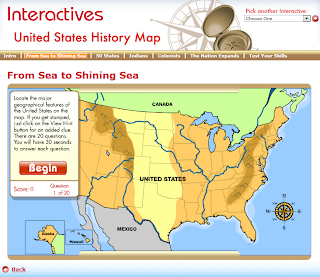
I am highlighting the US history one, but there are many great ones at this site.  I found that even though many are listed for older children, there were pieces in each one that I could use with my 3rd graders--either as a whole class lesson or as an extension for some of my high-achieving students.


The US history map above has some pretty nice features.  It breaks US history into categories, does a short lesson on it, and then has students participate in an interactive review.  You can skip through the eras if you don't want to do them all.  At the end of the map there is a comprehensive review assessment that students can do and receive their score.

Check out these interactives.  They cover all content areas.  I think they are worth your time!

Wednesday, February 8, 2012

Word Clouds

Word clouds are a great way to encourage students to use technology to "show what they know."  They are so much fun and have so many different uses. I have students use them to tell me about a book character, the elements of a book, to illustrate a theme, or to determine what words they used too much in their own writing.  They could also be used to illustrate the theme of a piece of writing.  Below are a variety of word clouds from some different sites.

I love Wordle.  They are easy to create and flexible to edit for adults and kids.  The wordle below is one I made by entering in all of the Presidents' first, middle, and last names.  If you are hoping for a successful son, it looks like you might want to name him James, William, or John.  :)


Tagxedo is another fun word cloud generator.  It works very similarly to Wordle, but you have the flexibility of creating your tagxedo into a shape, and when you hover over a word in the shape, it will pop out...
This is one I made just by entering the URL of this blog.  I was unable to find a way to embed it, so it appears as an image and loses its interactivity.  However, still cool!


Word it Out is another word cloud site.  It is easy to use, also.  The one I made here uses the words from this year's classroom expectations that my students created.


TagCrowd doesn't have quite as many options, but it does allow for a word count.  This would be a good one for students to use to review their papers for repeated words.  This one was made by entering the URL of our class website.


ABCYa also has a word cloud generator.  It is easy to use.  It just doesn't have the options that some of the others have.  Here is one I created for The Gettysburg Address.


Word Mosaic is another one that is easy to use.  You import your words and determine the shape.  It will allow you to embed the image.  The one below is one I created for Valentine's Day..."How do I love thee?  Let me count the ways..."
ImageChef Word Mosaic - ImageChef.com

Share with me any other ideas you have for the use of word clouds.  They don't always have to be printed out.  Students can put them into blogs, you can place them in your blogs, wikis, or online portfolios.  Leave me a comment about any of these sites.  I love hearing your ideas!


Sunday, February 5, 2012

Mt. Vernon virtual mansion tour

Have you ever been to Mt. Vernon, George Washington's home?  It is located in Virginia, a short distance from Washington, DC.

I have been lucky enough to go there a couple of times.  It is a beautiful estate, and it oozes the feeling of importance that it should.  How cool is it to touch the banister that George and Martha Washington did?  I love that kind of stuff!

Anyway, while looking for more Presidential information, I came upon a virtual tour of Mt. Vernon.  I think it would be a great thing to share with students.  Click on the picture below to access the tour.


If you get the chance to visit our nation's capital, I highly recommend making the effort to get out to Mt.Vernon.  It can be accessed by public transportation (train and bus), and it is well worth it!  Plan on a long visit--the mansion is beautiful and interesting, but the museum located on the estate grounds is interactive, informative, and fun, too!

Saturday, January 28, 2012

Presidents Day and Fraboom!


Have you tried the website called Fraboom?  It calls itself an online children's museum.


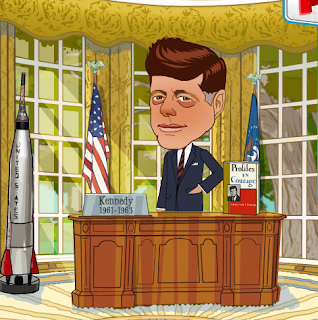
The website has many parts to it, but I wanted to share the Presidents exhibit with you.  Click on President Kennedy to go this part of the site.

Here, students can learn about different Presidents, and by finding the interactive elements of the Oval Office, learn different details about his life and Presidency.  There is also a neat little replica of the White House where students can get an idea of what it looks like.


There is another part of the site, called Fraboom TV, and on  that section, students can watch short videos that cover everything from how to draw a cartoon mouth to how a bill becomes a law.  Kids I think will love  it, and I like that it offers me a new way to present some of my material. 


 Fraboom is a free website, but it does offer a $5.99 per month membership where you gain access to more of the site's elements.  I found the free site and its components to be enough to keep me busy for a  while!


Friday, January 27, 2012

Multiplication Linky Party

Adrienne over at Wiggins World is having a multiplication linky party.  I thought I would share a couple of things that I have done to help my students learn their facts.

I like to practice their facts on a mat that I made that is similar to Twister.  I made my mat using a plastic tablecloth from the party store. It is a lot like my spelling kinesthetic game that I use and have blogged about before.  Anyway---I have two kiddos line up facing the mat and then a third student calls out a fact using flashcards or whatever.  The students try to be the first one to find the product.  The first one that finds it puts their left foot on it.  The game continues until one player has placed his left foot, right foot, left hand, right hand.  Kind of fun.  The kids like it for sure.  I don't have a current picture of my mat in use, but below is an image of what it kind of looks like.

My students also like this game.  3 players.  Two players have a stack of cards in front of them (No face cards).  The two players each pick up a card and place it on their forehead (number out) without looking at it themselves.  They can only see the other guy's card.  The third player multiplies the two numbers in his head and says the product aloud.  The first of the two players with the card on their head to say what number their own card must say is the winner of that round.  This game is especially good as students move into division and to reinforce fact families.

On the web, my students like to use Sumdog.com to practice their facts.  (It is awesome!)  When they are practicing a certain family, the best place to go, they go to multiplication.com.  It offers a variety of games where the kids can really focus on just one family if they wish.

Finally,  my students still love good old-fashioned mad minutes.  We do a lot of things to help reinforce the concept of multiplication so that they understand it, but to get them to really have rapid recall of the facts, timed tests are still the best in my book.  The kids like the challenge of it, too.  I structure it differently every year, and I totally differentiate by giving some students a reduced number of problems, giving some kids division facts, by giving some extension facts (40 x 60...), and whatever else it takes to challenge some and to make others feel successful.

Hope these ideas help you out!  Can't wait to get some new ones!

Friday, January 20, 2012

Fun Creative/Art Sites for Students

As a child, I loved to draw and create.  Many of my students are the same way.  The links below will allow them to create pictures and images in a fun techy way!


Do you have any others to share?  I love comments!

Wednesday, January 4, 2012

Using QR codes to share products

We do a fun unit on Earth Science in which we combine all of our Earth science book units.  I teach a lesson from each unit, but the main learning comes when students guide their own learning.  What I mean is, I have a large assortment of books that I provide on the different subjects (weather, erosion, earthquakes, volcanoes, Earth's layers...), and the students choose what it is they want to learn more about and post sticky notes about this learning on a wall in our room.


The wall is divided into the different topics of the unit.  Students are given specific days during science for this investigation, but they are also allowed to work on it during reading workshop if they choose.  Our wall slowly fills up with post it notes.

As we are coming to the end of the unit, students then can look at all of the post-it notes (not just their own) and they must share a new, interesting fact with us about two of the different topics.  Their sharing is pretty much their choice, but they have to provide a few sentences about  their fact (the hard part is IN THEIR OWN WORDS), and provide a visual to accompany it.  The visual can be a chart, diagram, a picture, an artwork, a craft, or a digital product. 

With the digital products, students found websites, created Vokis, or made other online products, we created QR codes for them, and posted the QR codes.  Visitors could use their smartphones to then access what the student wanted to share.  We used QRstuff.com to create the QR codes.

I know that this would have been an even cooler assignment if the kids were older and actually had their own phones to use, but it was a good learning experience for them, and a great way for them to share their information with me!  I just use my Iphone to read the codes and then can grade their product.  I think that I will continue to offer this option for students on other choice assignments.

Sunday, January 1, 2012

10 Websites for my students in 2012

Happy New Year!  This list is a compilation of websites that my students use regularly and a list of sites that I plan to introduce them to using more often.  Hopefully, I will feel some more accountability by listing them here.  Let me know if you have tried any of these sites or have any others to recommend!  (I like getting comments!)


1. KIDBLOG:  My students currently use Kidblog.  It is their "reading journal" for our class.  The results I have seen have been wonderful!  Some of my students who would not write before now write without my loving persuasion.  The kids are currently given the assignment of one entry per week.  I am able to score that entry from any computer and post the child's grade in Kidblog so that only they and I can see it.  Soon, their assignment will be an entry and a comment on another classmate's blog per week.  Many of them already comment on each other's blogs.  It is so nice to see them ask questions about books and to add books to their reading lists through these blogs.  Students have access to their blogs from home, and many post extra entries as well as comments from there.  This is something that has strengthened our reading community, our writing and our reading.  I would recommend student blogging to anyone!  Love it and what it has done for our classroom.


2.  BRAINEOS:  Students create flashcards or use already-created decks to study facts or information.  Students can practice these terms as flashcards or play games on the website using the same information.  There are a number of these type of sites, and this is the one I have played with the most.  I am beginning with me creating decks that my students can access, and then going to encourage them to create their own decks.


3.  CLASSCONNECT:  We use Classconnect every day in my classroom.  It is a classroom management system where I can post documents, websites, videos...for my students to access in the classroom or at home.  Students can upload documents for submission to me, check our classroom calendar, or make comments on our homepage.  This site requires the teacher to set up a class and then to have students login with a code to set up their accounts.  (I just set up each of my students accounts for them.  It saved me a ton of time.)  This site is doing some upgrading in the next couple of weeks, and we have been told changes are coming, but I am sure that it will still be a great place for my students and I to connect!


4.  WORDLE:  This site is an old-time favorite of mine.  Students input a set of words and a word cloud is generated.  I use it for character analysis, spelling word practice, theme development, and much more.  We also like Tagxedo, but this one seems more user-friendly for us.


5.  GLOGSTER:  My students have had some practice with this site, but not for creating something as a product.  I am hoping that some of my students will use this online poster generator as an option for some of their projects this semester.  It is a fun site, but can be a little finnicky sometimes.  Also, it requires a login/password account.

6.  WALLWISHER:  Wallwisher is so easy to use!  You go in and create a virtual bulletin board for your class, and then it gives you a URL to share.  Once you have shared your URL, students can post sticky notes onto the wall about a subject you have chosen.  I use this to practice skills during reading workshop (Everyone make a prediction about this book, tell me the genre of this text...) and to have students have a place for questions or comments during a content lesson.  My kids like it a lot, and students comment or ask questions who would not typically be contributing to class discussion.  :)

7.  SUMDOG:  My kids love Sumdog.  It is a math practice site where they are able to practice skills playing a variety of games against other users in the world.   As a teacher, I can set the parameters of each child's skill set thus allowing for differentiation.  I can also set class challenges.  The site gives the students feedback on what skills they have mastered.  Teachers can pay for a reporting service, too, but I am able to get enough data from my and my students' accounts that I have not paid for reports.

8.  STORYBIRD:  This is an easy-to-use online publishing site.  Students create books using beautiful artwork provided by the site.  Students choose and align pics as they wish and then add text to make a story.  They can build a library of stories in their account, and these stories are accessible from home.  A class account and individual names had to be setup, but it was worth the small amount of time it took!

9.  VOKI:  Kids love to create Vokis, animations that repeat what you record or type in.  I have had students create Vokis to share information, quotes, or just to liven up a presentation.  Once the Voki is created, it can be embedded into a blog or website or you can link up to its URL.


10.  VISUWORDS:  This is an online graphical dictionary which provides great visuals of a word, its meaning, related words...Very simple to use, and really helps kids to understand the word rather than just memorizing its meaning.